Available now for macOS · 30 minutes free each month

Be all there.
Beak handles the recall.

Beak listens to the interview or call on your Mac, recognizes the question, and drafts a concise answer grounded in your résumé, the role, and your notes. No meeting bot. No frantic searching.

  • Built for macOS
  • 30 free minutes monthly
  • No bot in the meeting
  • Optional saved history
Beak's live overlay during an interview: a listening bar and a suggested answer, grounded in your résumé

The real Beak overlay—running beside your call, never joining it.

The problem isn’t preparation

You know your experience. Pressure makes it harder to retrieve.

Interviews compress years of work into a few seconds of recall. The useful example is in your head, the metric is somewhere in your notes, and the conversation keeps moving. Beak closes that gap without asking you to leave the moment.

01

The answer arrives late

You remember the strongest example after the call instead of while it can help.

02

Your notes become a distraction

Searching tabs and documents costs eye contact, attention, and the thread of the question.

03

Generic AI misses your truth

A blank chat box knows how to sound polished. It does not know which claims are actually yours.

Beak is the retrieval layer between the question being asked and the experience you already earned.

How it works

From your experience to an answer you can use.

  1. 01

    Give Beak the brief

    Add your résumé, the job description, reference documents, or a few notes. You choose the context Beak can use.

  2. 02

    Start your call

    Beak transcribes microphone and system audio in real time from your Mac. It runs alongside Zoom, Meet, Teams, or any other call—not inside them.

  3. 03

    Get the next answer

    Let Beak recognize a question automatically, type what you need, or share your screen for help. The response arrives as short, speakable points.

A closer look
See exactly what you’ll use.

Real screenshots of Beak running on macOS—no concept renders.

Beak's live overlay with the settings menu open
Stay with the interviewer. Beak recognizes the question and turns your context into short points you can adapt—not a paragraph you have to perform.
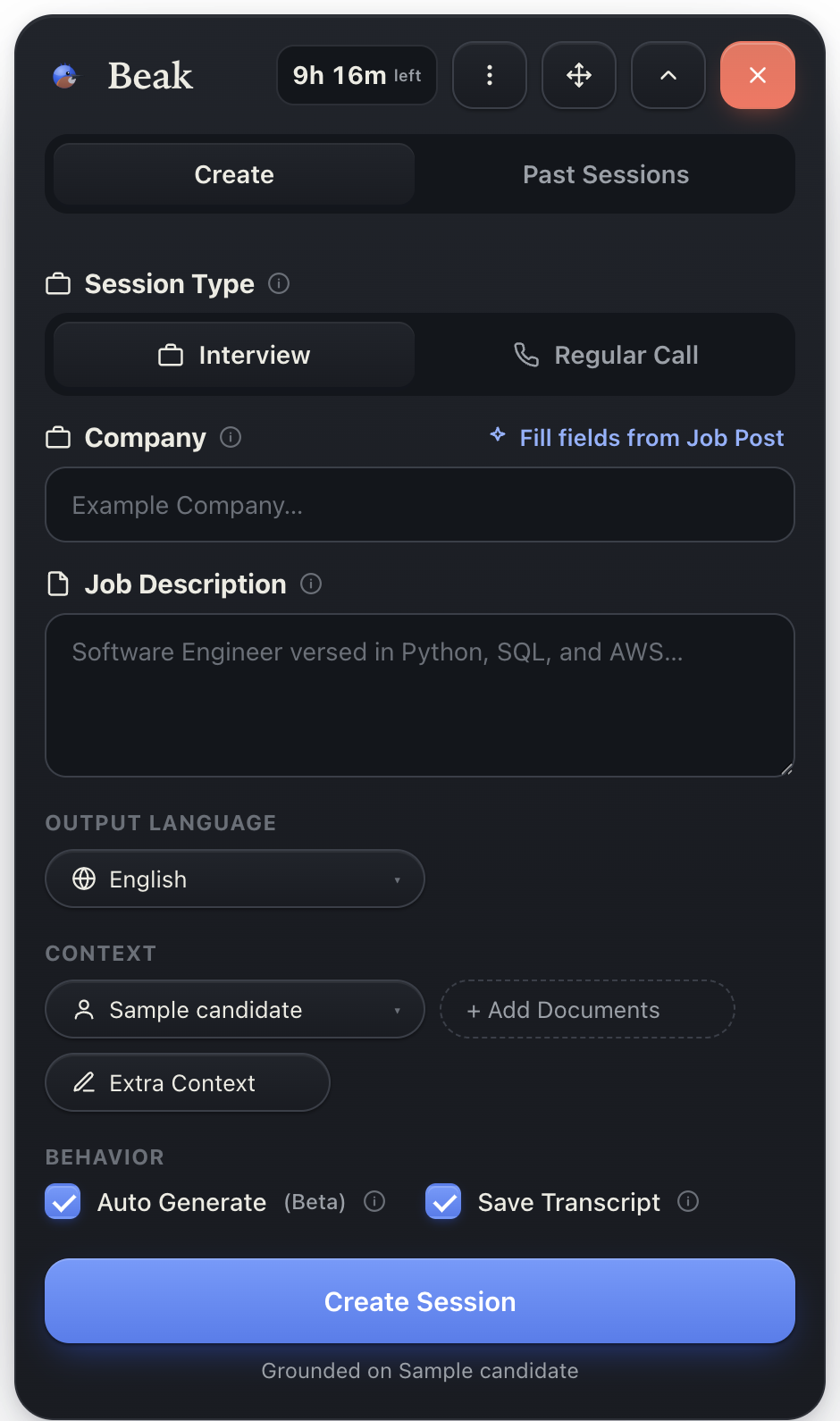
Beak's create-session card
Make the answer yours before the call starts. Add the role, résumé, and documents once; Beak carries the relevant context into the session.
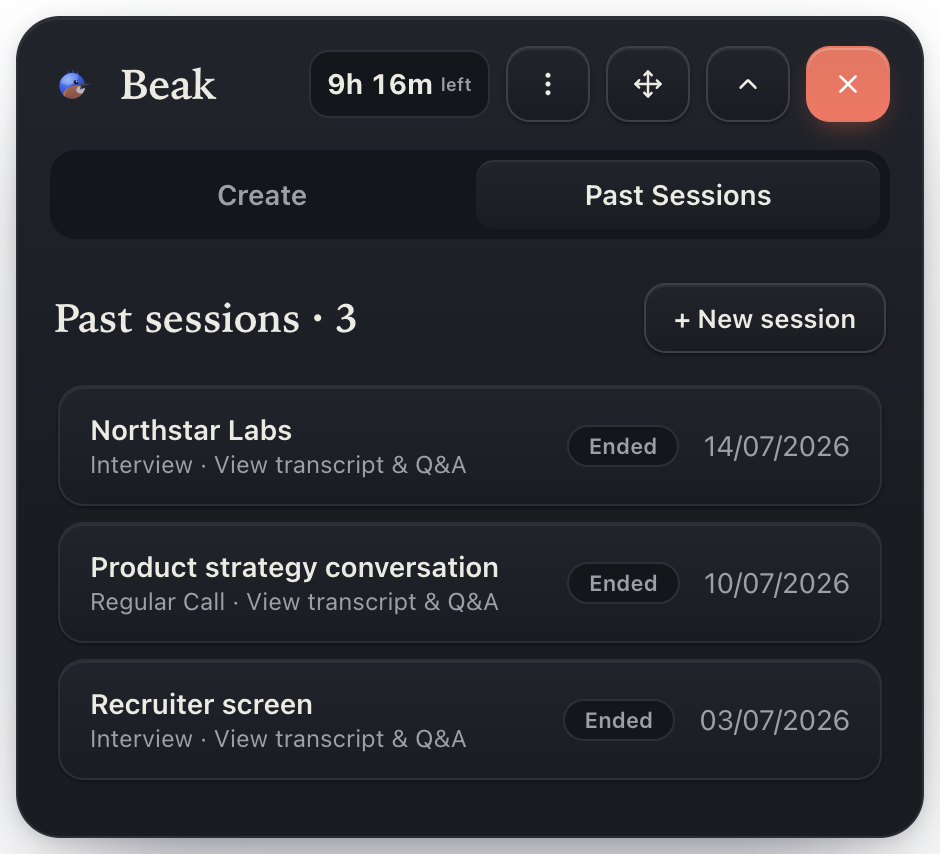
Beak's past-sessions list
Turn the call into useful follow-up. Save a session when you want to revisit the transcript and answers. Turn saving off when you do not.
Beak collapsed to a floating bubble
Or tuck it away.Collapse Beak to a floating bubble when you don’t need it — one click brings it back.

The complete live-answer system

Five moving parts. One calm overlay.

You should not have to assemble transcription, prompts, models, document search, and screen tools five minutes before an interview. Beak runs the machinery as one service.

What you do

Bring the experience. Stay in the conversation.

No API keys, model picker, prompt library, or meeting bot to manage.

  1. ListenLive microphone and system-audio transcription
  2. RecognizeAutomatic question detection when you want it
  3. GroundRésumé, role, documents, and notes you select
  4. RespondConcise, speakable points instead of generic essays
  5. AdaptDirect questions, screen analysis, and optional history
Before

Prepare once

Load the role and your real experience instead of rebuilding prompts for every question.

During

Recover quickly

Get the useful example or structure while the question is still yours to answer.

After

Keep what matters

Choose whether the session disappears or becomes a record you can revisit.

Clear by design

Your live assistant—not a meeting guest.

Beak never appears in the participant list and no one else has to install it. Live audio is transcribed by Speechmatics, while OpenAI receives the recent transcript and context needed to answer. You choose whether Beak saves the transcript, and you can delete saved sessions from your account.

Read the data questions
Beak is readyMac overlay · no meeting bot

Start with the moment where recall matters most.

  • Interviews
  • Recruiter screens
  • User & research interviews
  • Technical questions
  • Team & client calls

Beak is built first for interviews—not as a generic AI sidebar pretending every call is the same. The same retrieval system remains useful in research, technical, team, and client conversations.

Pricing

More confidence. Less machinery.

One price covers the transcription, AI, context, question detection, and screen help. Start with 30 free minutes every month and test the complete product in a real call.

Free · no credit card

Start with the complete product.

$0/mo

30 live minutes every calendar month

  • 30 minutes across as many sessions as you need
  • Interview and regular-call modes
  • Résumé, documents, notes, and job context
  • Automatic answers, direct questions, and screen help
  • Hosted AI included—no separate model bill
Start free

Download Beak first, then create your account when it opens.

Beak Pro

More time for bigger weeks.

  • Founding price$19 · 10 hours
  • Standard monthly price$29 · 6 hours
  • Everything in FreeIncluded

The first 100 paid subscribers keep the founding price while that subscription remains active. Checkout is securely handled by Paddle.

Create an account

Questions

The things people ask first.

Beak is a live conversation assistant for macOS. It follows interviews and calls, recognizes questions, and drafts concise answers grounded in the context you choose to provide.

Available now · macOS

Get ready for your next interview.

Create your account, add your context, and use the complete Beak experience for 30 minutes every month—free.

Download Beak